Saturday, January 21, 2012

Professional Photography Prices and Rates


Photo captured by Grigoryev Sergey (Click Image to See More From Grigoryev Sergey)

Pricing… you can’t work as a professional photographer for very long without becoming caught up in the subject of pricing your work (well, you could, perhaps, but you would never make any money). Then there’s the question of, not only what prices to charge, but also how to educate your clients about your price list without them bailing out or thinking you’re trying to pressure them.

In the time that I’ve been running my studio as a professional photographer, I’ve explored different methods of presenting my prices to clients and potential clients, with various degrees of success. These include the usual suspects…

  • Printed price menus
  • Combined price list and brochure
  • Web site price page
  • By sending out price lists by email

But, the issue I had with these methods was that sales just didn’t seem to be where I wanted them to be. I would hand out price lists to prospects who requested them, count the accesses to my price list website page, or email my list to anyone who asked for it – yet the clients disappeared as quickly as they came, like ghosts. This was a complete puzzle to me, and it doesn’t take too much of that to imagine that, “my prices must be too high.”

Looking at my price list, and considering the lack of returning customers, I really did start to think that my prices were too high – so I made the awful mistake of lowering them. Yes, you guessed it – I got just the same result. The moral is that we can get tangled up in a vicious cycle of always fiddling with the fees.

Is any of this familiar? Are you stuck in that wasteland of trying to second-guess your prospects to find out what you think they would easily pay, rather than what you believe they should pay?

You aren’t alone – just about every professional photographer I know has encountered this painful process. But, there is a solution…

Don't Tell - Show:

The answer to this problem really requires three distinct things. First, you should decide what your products and services are going to be (i.e. what it is that you’re actually selling). Secondly, you should decide on your fees, based on your production costs, level of competition and income requirements. Lastly, produce one price list that is yours, and yours alone.

That’s correct, just ONE – no one sees your complete price list unless you personally give it to them – complete with a full sales presentation and in-depth explanation of everything you offer.

I can hear you exclaiming, “that’s the dumbest thing I’ve heard!” but stick with me here for just a moment.
There is a perfectly good explanation why the other methods don’t work effectively. When a customer looks at a web site and finds a price list, they can see how much a portrait or a wedding package costs. But how are they going to compare that with what they’ve seen elsewhere, except by the price?

All of a sudden, your prospect has been turned into a price comparison shopper! In the mind of most clients, all 8x10s are printed equal – but we know that couldn’t be more wrong. It’s what is printed on the paper that’s critical, not the print itself. But how can we clarify this to the prospect when they are a web browser or someone sitting at home reading a price list?

Wedding photography packages are an even better example. Displaying a price for a collection on a web site or in a pamphlet they can take home is only going to make the prospect think, “I get such and such for this price, but that other photographer down the street will give me the same or more for a lower price.” You and I both know that the “other” photographer won’t put as much time into the wedding day as you will, doesn’t have the level of experience you do, won’t deliver as fast, or simply isn’t as professional. But the prospect is only looking at prices.

The same thing goes when the prospect calls you on the phone. The first question is, “how much?” If you answer that question straight away, they’re gone, and we never hear from them after that. Instead, we have to divert our chat away from the price (at least at the beginning of the call) and on to the less logical reasons for the photography they’re looking for. Once we’ve had a chance to educate them about what makes us unique, then we can gently mention pricing, after which we arrange to meet with them personally for a more detailed consultation if the price is within their expectations.

By the time the prospect meets with you for a consultation, they already understand that your prices are affordable.

The Personal Touch:

As you might expect, I meet with every prospect before I allow them to book a portrait session or a
wedding. This is an opportunity to give my complete sales presentation before showing them my price list. As a salesperson, it is my job to ensure I understand as much about their wants as possible before selling them anything – they won’t care what I know until they know I care about them. If making money is the only motivator to you as a professional photographer then you are in the wrong business.

There is one copy of my price list, and I keep it in a leather binder, printed on fine paper. To the prospect, it looks like an official copy, which it is, and nobody has ever asked to take it home.

When I’m meeting with a customer to discuss a wedding or portrait session it can take 45 minutes to an hour before we ever get to the topic of price. The price list is there in front of them, I’m sure they know what it is, but I don’t open it until I’m ready. If they ask about the price list, and I don’t feel ready for them to see it, I simply say, “I’m so happy you brought that up, and I’ll be glad to go over it shortly. But first…” and then I ask them more questions about the wedding or portrait.

By the time we do get to the price list, we’ve talked about the wedding day, how the couple met, what they like to do together, what’s important to them and their family about the wedding, how many bridesmaids & groomsmen they have, the color scheme etc. At that point, they understand that I really care about them, and now the topic of price is no longer the main driving force. Obviously, they will have a plan in mind, and there should be a collection that falls within that range, but they are no longer just comparing our prices to everyone else’s. They are making a comparison – but it’s to do with things like service, quality, attention to detail, personality etc.

"Selling" - Stop At The Top !

When I go through the price list I start with the most expensive choice, even if they’ve already indicated their budget. Doing it like this, I only have to sell down and not up. Selling up is as hard as climbing a mountain – it’s usually much simpler going down than up.

Don’t make the awful mistake of confusing this method for pressure sales, because it isn’t. The reason for selling down is to help them become involved with a package that’s right appropriate for them, even if it does happen to be the cheapest one you offer.

The client doesn’t understand as much about creative professional photography as us, so they may not truly understand which considerations they ought to be most concerned about. Instead, they get stuck on the only thing they can relate to, which happens to be the price. At the end of the day, it’s our job to get them off the price, and re-connect them with the real elements of what we do.

Summary:

I just want to make sure that I do underline this point:

I have only one printed price list to show to prospective clients – there are no prices listed on my web site, no prices emailed out to those who ask for them, no detailed prices given over the telephone and no brochure with a few photographs and my prices for them to take away.

I am not hiding anything from my customers or trying to deceive them – that’s not the way to run a solid photography business. But, it does demonstrate to my prospects that I value them above the prices for my photography. It also helps to screen out the types of prospects I don’t want to work with – the ones to whom price is the main important factor and to whom family, relationships, memories and emotions are not as valued.

So far, no one has complained about this procedure. My customers now treat my prices with respect and they understand the context in which they’re given. This encourages better sales and, in my opinion, an overall better experience for the prospect.

About the Author:
Nigel Merrick is a professional photographer, blogger and business coach for other working photographers. Nigel’s blog ( Photography Business and Marketing ) helps professional photographers find peace in their business, love from their clients, and happiness in their personal lives by clarifying their focus on business and marketing.


--------------------------------------------------------------------------------------------------
Liked this? Then share this page and subscribe to get the top stories of the week, plus the most popular reviews delivered straight to your inbox.

And don’t forget to give us your suggestions in the comments!


View the original article here

Nikon D4

The New 16.2 Megapixel Nikon D4 Wields a Formidable Fusion of Swift Performance, Battle-Tested Technologies and Innovative New Features to Create High Caliber Photo and HD Multimedia Content

Jan. 6, 2012 – PRNewswire: The new Nikon D4 digital SLR builds upon the legacy of the proven Nikon flagship D-SLRs before it, engineered to give today’s professional multimedia photographers a new apex of speed and accuracy with unparalleled image quality, low-light capability and Full HD video. The Nikon D4 hosts a multitude of advanced new features and useful functions that deliver speedy performance and amazing image quality for when missing the shot is not an option.


Nikon presents their new flagship DSLR: The D4

Every aspect of the new Nikon D4 D-SLR has been designed to emphasize rapid response and seamless operation to help professional photographers consistently capture incredible content. Nikon’s proven 51-point AF System has been further enhanced for maximum speed in a variety of challenging shooting situations, even at 10 frames per second (fps). Considered the new Nikon flagship, the D4 renders supreme image quality, a feat accomplished with a new 16.2-megapixel FX-format CMOS sensor, coupled with the latest generation of Nikon’s EXPEED 3 image processing engine to help produce images and videos with stunning clarity and color.

Photographers are also able to shoot in even the most challenging environments and lighting conditions with the assistance of Nikon’s new 91,000-pixel 3D color matrix meter and a broad ISO range from 100 to a staggering 204,800 for low-light capture like never before. The Nikon D4 is engineered for the modern professional and incorporates never before seen HD-SLR video features for those who also need to capture multimedia content from the field.
“Speed without accuracy is irrelevant,” said Bo Kajiwara, director of marketing, Nikon Inc. “The status of a Nikon flagship camera is not given lightly; this next generation of Nikon’s most professional body exceeds the needs of a wide variety of both still and multimedia professionals that rely on Nikon to make their living. Besides overall performance and burst speed, the D4 provides Nikon’s most advanced AF system to date, as well as enhanced workflow speed to give professionals the edge in the field.”

Velocity Meets Versatility:

Speed is a necessity for today’s multimedia photographer as milliseconds matter when the action commences. Whether an assignment relies on fast processing power, burst rate, write speed, enhanced workflow or even streamlined camera controls, the D4 is the epitome of professional-caliber photographic horsepower. Ready to shoot in approximately 0.012 seconds, the new Nikon D4 can capture full resolution JPEG or RAW files at up to 10 fps with full AF / AE or up to 11 fps with AF / AE locked. Immediately before image capture, the camera interprets data from the AF sensor, including subject color as detected on the 91,000-pixel RGB sensor, to deliver consistently tack-sharp focus frame after frame. Whether a photographer is shooting a full-court fast break under gymnasium lighting or the downhill slalom in the bright sun and frigid temperatures, the D4 will instill the confidence with consistently great results.

The Advanced Multi-Cam 3500 AF autofocus system is the next generation of Nikon’s proven 51-point AF system. The fully customizable system offers users the ability to capture fast moving subjects and track focus with precision or select a single AF point with pinpoint accuracy. The Nikon D4 D-SLR aligns 15 cross-type sensors in the center to detect contrast data in both vertical and horizontal planes. In addition to detecting each AF-NIKKOR lens with an aperture of f/5.6 or lower, the camera also utilizes nine cross-type sensors that are fully functional when using compatible NIKKOR lenses and TC14E or TC17E teleconverters or a single cross-type sensor when using compatible NIKKOR lenses and the TC20E teleconverter with an aperture value up to f/8, which is a great advantage to those shooting sports and wildlife. For maximum versatility in situations such as photographing nature from afar or competition from the sidelines, photographers are also able to select multiple AF modes, including normal, wide area, face tracking and subject tracking, to best suit the scene.

The Nikon D4 D-SLR also employs a new 91,000-pixel RGB 3D Color Matrix metering system that meticulously analyzes each scene and recognizes factors such as color and brightness with unprecedented precision. This data is then interpreted and compared against D4's on-board database to implement various settings, resulting in vibrant images with faithful color reproduction and balanced exposure. In addition, this new AF sensor now has the ability to detect up to 16 human faces with startling accuracy, even when shooting through the optical viewfinder, allowing for correct exposure even when the subject is backlit. Additionally, to capture every brief moment from a bouquet toss to a photo finish under nearly any condition, the 51 focus points deliver fast and accurate detection down to a -2 EV with every AF-NIKKOR lens.

All of this image data is funneled through a 16 bit pipeline and are written to dual card slots which have been optimized for the latest UDMA-7 Compact Flash™ cards, as well as the new XQD™ memory card. The D4 is the first professional camera to harness the capabilities of this new durable and compact format, which offers blazing fast write times and extended capacity essential for multimedia professionals shooting stills and video.

Image Quality That Hits The Mark:


The heart of the new D4 is the Nikon-developed 16.2-megapixel FX-format (36 x 23.9mm) CMOS sensor that provides amazing image quality, brilliant dynamic range and vivid colors in nearly any lighting condition. By achieving the optimal balance of resolution and sensor size, professional photographers will realize exceptionally sharp, clean and well saturated images throughout the entire ISO range.

Like the D3 and D3s before it, the Nikon D4 retains Nikon’s status as the sovereign of low-light capture ability, with a native ISO range from 100 to 12,800 ISO, expandable from 50 (Lo-1) to an incredible yet usable 204,800 (Hi-4). From a candlelit first dance to nocturnal wildlife, the large 7.3 micron pixel size absorbs the maximum amount of light to excel in any situation. Additionally, the sensor’s construction features a gapless micro-lens structure and anti-reflective coating which further contributes to images that retain natural depth and tones with smooth color gradation. For ultimate versatility, photographers can also take advantage of the camera’s extreme high ISO ability while recording video.

Another factor contributing to the camera’s rapid performance and stellar image quality is Nikon’s new EXPEED 3 image processing engine that helps professionals create images with amazing resolution, color and dynamic range in both still images and video. From image processing to transfer, the new engine is capable of processing massive amounts of data, exacting optimal color, perfect tonality and minimized noise throughout the frame.

There are also a variety of shooting options available to help capture the highest quality images and video. In addition to standard NEF (RAW) files, the D4 is also capable of shooting smaller compressed RAW files to ease storage and speed up workflow. Users are also able to capture even more dynamic range with the in-camera High Dynamic Range (HDR) function that merges consecutive exposures. For deep contrast and further tonality, Active D-Lighting can also be activated during shooting for balanced exposures even in backlit scenes. Additionally, the camera features a dedicated button for quick access to Nikon’s Picture Controls, allowing users to quickly select one of six presets.

Professional Multimedia Features:

The Nikon D4 D-SLR is engineered with innovative new features for the multimedia professional that needs the small form factor, low-light ability and NIKKOR lens versatility that only an HD-SLR can offer. The new features add functionality for those professionals looking for the best possible experience to capture a moment in Full HD 1080p video at various frame rates, providing footage that is more than suitable for broadcast.

Full HD video recording – Users have the choice of various resolutions and frame rates, including 1080p 30/24fps and 60 fps at 720p. By utilizing the B-Frame data compression method, users can record H.264 / MPEG-4 AVC format video with unmatched integrity for up to 20 minutes per clip. This format also allows for more accurate video data to be transferred requiring less memory capacity. The sensor reads image data at astoundingly fast rates, which results in less instances of rolling shutter distortion.


Full manual control of exposure – Shutter speed, aperture and ISO can be changed while recording to adapt to lighting and alter depth of field for professional cinematic results that help realize a creative vision.


Uncompressed output: simultaneous Live View – By using the camera’s HDMI port instead of the CF or XQD card, users can stream an uncompressed full HD signal directly out of the camera. This footage can be ported into an LCD display or appropriate external recording device or routed through a monitor and then to the recording device, eliminating the need for multiple connections.


Audio recording for professionals – The Nikon D4 features a stereo headphone jack for accurate monitoring of audio levels while recording. Output can be adjusted in up to 30 steps for precise audio adjustment. The D4 offers high-fidelity audio recording control with audio levels that can be set and monitored on the camera’s LCD screen. The microphone connected via the stereo mic jack can also be adjusted with up to 20 steps of sensitivity for accurate sound reproduction.


Multi-area Mode Full HD Video: FX/DX, and 2.7x crop mode at 1080p video modes – Whether shooting for depth of field in FX format mode, or looking for the extra 1.5X telephoto benefits of DX mode, the high resolution sensor of the D4 allows videographers to retain full 1080P HD resolution no matter what mode they choose. With the 2.7x crop, users can experience ultra-telephoto benefits in full HD resolution all at 16:9 aspect ratio.


Simultaneous live view output without display / simultaneous monitor – Shooters have the option to send the display signal directly to an attached monitor via the HDMI port. This signal can be viewed on the camera’s LCD screen and external monitor simultaneously. Additionally, the image data display can be cleared from the screen, to remove distracting data or when feeding a live signal.


Full-time AF – In addition to manual focus, four modes are available, including normal, wide area, face detection and subject tracking, which uses fast contrast detect AF to accurately focus while recording video and in live view.


New LCD screen – The large high resolution 3.2-inch LCD screen is 921K dots, and includes auto brightness adjustment. Users can also zoom in up to 46x to check critical HD focus.


Time lapse shooting – This new feature combines a selected frame rate and “shooting interval” in a dedicated time lapse photography menu. Playback can be achieved with a wide variety of speeds from 24x to 36,000x while producing a fully finished movie file output for faster multimedia workflows.


Remote shutter operation – Using dedicated Movie Custom Settings, recording can be set to be engaged by the shutter release button -users can now use a variety of remote accessories to trigger video recording.


NIKKOR lens compatibility – The highest caliber optics are vital to creating HD images and Nikon is the world leader in optics manufacturing with a legacy spanning more than 75 years. Nikon has a vast NIKKOR lens system, with more than 50 lenses with a variety of focal lengths and features, including VR II vibration reduction.

Professional Construction, Superior Operability:

 The reputation and respect bestowed upon a Nikon D-Series flagship camera is earned from those who use it; therefore the chassis of the Nikon D4 is machined from magnesium alloy for maximum durability and reliability. The body of the camera is sealed and gasketed for resistance to dirt and moisture, as well as electromagnetic interference. Photographers are able to easily compose through the bright optical viewfinder, which offers 100% frame coverage. The shutter has been tested to withstand 400,000 cycles for maximum durability, while sensor cleaning is employed by vibrating the OLPF. The self diagnostic shutter unit also encompasses a mirror balancer to minimize the residual “bounce” to enhance AF and extend viewing time. What’s more, the viewfinder is coated with a new thermal shield finish which works to resist overheating during prolonged use, enhancing overall reliability. Users can easily compose on the camera’s wide, bright and scratch resistant 921,000-dot high resolution 3.2-inch LCD screen.

The overall controls and operability of the camera has also been engineered with a renewed emphasis on speed and functionality. During critical moments, users will appreciate refined button layouts with renewed ergonomics, such as a quick AF mode selector placed near the lens mount for fast access on the fly. A new joystick style sub-selector is also placed on the camera’s rear for AF point and option selection, while vertical controls have been enhanced for improved operability. Finally, to continue the D4's moniker of the best tool for just about any condition, key control buttons on the back of the camera can all be illuminated, making the camera simple to operate in complete darkness.

Nikon has also made enhancements to overall workflow, adding options to streamline the process and maximize shooting time. Users are now able to automatically generate IPTC data for their images and image sets, making organizing and chronicling images easier for both the photographers and their editors. A wired Ethernet port is also utilized so that a user can shoot tethered and transfer images easily and quickly to clients. Nikon has also introduced the new WT-5A wireless file transmitter, to transmit via FTP server or computer. The device can be set to transfer either automatically or manually selected images. This device also allows for remote operation of the camera using Nikon’s Camera Control Pro 2 software. A mobile application is also in development to control the camera using this accessory, which will include the ability to trigger the shutter and record video, making this a must-have remote accessory for many professionals.

Price and Availability:

The Nikon D4 will be available in late February 2012 for the suggested retail price of $5999.95.


--------------------------------------------------------------------------------------------------
Liked this? Then share this page and subscribe to get the top stories of the week, plus the most popular reviews delivered straight to your inbox.

And don’t forget to give us your suggestions in the comments!


View the original article here

Rule of Space in Photography

If everybody needs space, so does the subject in your portraits. This is a rule in photography more commonly known as the rule of space. This rule states that if the subject is not looking directly to the camera, or looks out of the frame, there should be enough space for the subject to look into. This technique creates intrigue in the minds of the viewers. Moreover, studies show that people viewing this kind of image will naturally look at the area where the subject is looking at.


"Enjoying the moment" captured by Kevin Travis (Click Image to See More From Kevin Travis)

Also, if you are taking pictures of moving objects like cars, bicycles, running animals and the like, this theory should still be applied. The image should present the moving object with more active space and less dead space. The active space is the area where the object is facing. On the other hand, the dead space is the area behind the subject. This strategy builds impact, shows the expression that the object is actually moving and has a destination. This also enables viewers to instinctively look to where the object is heading, thus, building excitement within the image and sets its mood.

Not only does it add dramatic accents in your photos, but it also creates a flow to naturally drag the attention of viewers to the direction of the subject.

While following this technique can help you achieve your desired photo, it can also be very interesting if you break this rule.

Breaking this rule, especially in moving objects where the space behind is what breaks or makes the image. Doing this kind of tactic will give the viewer an idea how fast the object had been and where did it come from.

Changing the framing and the look-space direction will also give a different meaning. A subject who runs and has too much dead space behind, means that he is leaving swiftly. But if you put active space in front of it, then it would suggest that the subject is leaving with a goal or target in front. This may also mean the start of his journey.


"basking in the twilight" captured by nikon ian (click image to see more from nikon ian)

Either way, you can experiment on your own. Who knows? You might be able to discover something new, something fresh and never been known. Just bear in mind what the rule of space states – put some active space to where your subject is facing in order to capture the element of creativity.

About the Author:
Samanta Vis is a talented photographer. She writes about several subjects including tips and how-tos in the field of digital photography.


--------------------------------------------------------------------------------------------------
Liked this? Then share this page and subscribe to get the top stories of the week, plus the most popular reviews delivered straight to your inbox.

And don’t forget to give us your suggestions in the comments!


View the original article here

High Speed Photography Tips


"POP!" captured by Louann Waters (Click Image to See More From Louann Waters)

Have you ever wondered how photographers were able to capture a water splash, bursting balloon, or a bullet hitting a fruit?

The goal of the high speed photography is capturing objects in motion. You can photograph events that follow a predictable sequence. In all cases you want to be able to detect a trigger, wait for an event and take a picture.

For example, in order to capture a falling drop hitting the surface of water, first you need to detect the time when the drop starts falling. Next, you create a delay between the trigger and the event. Finally you take the picture.

There are two methods for performing high speed photography with the timer. The first method uses a shutter of a camera. The second method uses an electronic flash.

Shutter Method:


The main advantage of the shutter method is that it can be used outdoors. The subject and the background can be fully illuminated. Since the shutter is used to freeze the motion of the subject, it offers a limited speed. Maximum speed of a shutter could range from 1/4000sec to 1/8000sec, in some cases it may not be fast enough (fast moving objects will become blurred).

Moreover, in cameras that have a focal plane shutter, a small slit moves across the photographic plane at much slower speeds (1/250), thus exposing different parts of the photographic plane at slightly different times.

Finally, there is a delay between the shutter release and the actual exposure. It could be as much 100ms or more (depending on camera). In addition there could be a small variation in timing, each time the camera takes a picture. Therefore this method should not be used when high timing accuracy is required.

Flash Method:


The second method of high speed photography is the flash method. The picture is taken by opening the shutter of the camera, activating the flash and closing the shutter. The picture needs to be taken in a dark room. Because the room is dark, the long exposure time will not have any effect on the final output. The flash light duration now becomes the actual exposure time.


Photo captured by dan2452 (click image to see more from dan2452)

The main advantage of the flash method is the exposure speed and better timing consistency. Electronic flashes are capable of light strobes with durations of 1/10,000 or faster (lower the power setting of the flash, the shorter the flash duration).

The lag between the trigger and the flash strobe is insignificant. The disadvantage of this method is that the picture needs to be taken in a dark room to avoid the over exposure. Also since the flash is used to make the exposure, it may be more difficult to provide a uniform lighting or to illuminate the background.

Equipment:

You will require three basic components for high speed photography:

  1. Camera.
  2. Flash.
  3. Photographic timer with sensors.


"Water balloon pop" captured by chris p (click image to see more from chris p)


About the Author:
Vito is an amateur photographer with particular interest in high speed photography. Universal Photo Timer is one of the general purpose photographic timers. Universal Photo Timer can activate camera shutter or flash in response to a trigger with a set delay. The timer interfaces to a number of optical and sound sensors making high speed photography ever more popular.

Check out this helpful video tutorial by the people from the Trick Photography eBook, you will learn how to freeze the motion of water splashes by using external flashes, a fish tank, and an object of your choice:


The trick photography training package is a very popular instructional eBook and video set that explain how to do most of the trick photos that often capture attention and amazement from viewers. With 300+ pages of information and 9 hours of video tutorials, it is very detailed and includes extensive explanations of many complicated techniques that are very fun to learn. It can be found here: Trick Photography and Special Effects


--------------------------------------------------------------------------------------------------
Liked this? Then share this page and subscribe to get the top stories of the week, plus the most popular reviews delivered straight to your inbox.

And don’t forget to give us your suggestions in the comments!


View the original article here

Thursday, January 19, 2012

Street Fashion Photography Tips

Shooting five to ten street fashion brands a day in a three to four hour window is a tough call for any experienced photographer. Professional photographer Nick Fancher does this day in day out and shares with us, some of the ways he maximizes his shooting efficiency, using a lightweight kit and his own lighting creativity in this tutorial video:


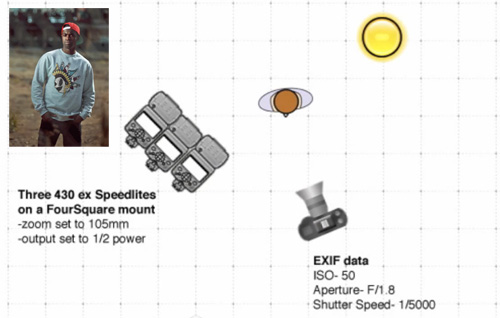
The first brand Nick tackles is Entrée, a street brand. Working on a derelict lot with harsh light, Nick is looking for a stylized look to emphasize the street look of the clothes. His setup:


Lighting setup to emphasize the street look

  • Three radio controlled flashes together on one stand, with the output set manually to half power.
  • The flashguns focus length was each set to 105mm to get a more direct light.
  • With the Canon’s high speed sync he was able to use a very high shutter speed of 1/5000 of a second allowing him to darken the background creating a gritty, urban look and punching out the colors in the models clothes.
  • By positioning the flashlights directly towards the sun, Nick was able to use the sun itself as a keylight and because of the high shutter speed he could use a wide aperture to throw the background out of focus.

The second brand Nick tackled was Saucony, a more sports oriented brand. Shooting their sports shoes required a clean look that was helped by a good sunny day. His techniques for this were:


Lighting setup to achieve a clean look

  • Shooting on a basketball court he was able to use the sunlight passing through a chain-link fence, to provide a creative shadow pattern as a background.
  • To emphasize the clean look he goes for a deep depth of field using an aperture of f11.
  • The shoes are rimlit from either side using radio-controlled flashlights, again set to 105mm, to tunnel the light towards the subject.
  • A third flashgun is used more or less in front of the shoes. This flash is zoomed out to around 24mm to provide a softer fill in light. The sunlight from the rear provides the keylight.

In his third shoot, Nick is tasked to photograph Palladium shoes and requires an urban look. Shooting from a rooftop, Nick uses the cityscape as a backdrop but uses a mid range aperture to soften the background and keep the emphasis on the shoes. To achieve the required look:


Configuration of lighting for urban shoes

  • He rimlights the shoes from either side using flashlights set to 105mm.
  • To fill in he fires a third flash from directly above the shoes with a setting of 24mm and set manually to ¼ power.

For Palladium, he is again on a rooftop, but has two models, both of whom need to be individually lit. This time he uses just two flashes:


Lighting two models in one shot

  • The rear model is lit from one side with a flash set to 105mm.
  • The front model is lit from the opposite side with the flash set to 24mm to soften its effect.
  • Using a mid range aperture, he has kept both models in focus but thrown the background out slightly.

The last shoot for Howler Brothers is shot simply with one on-camera flash:


Simple on-camera flash to fill shadows


  • Dialed again to 105mm the flash punches a nice direct light onto the model with enough power to stop the aperture down, punch out the skies and saturate the colors.

Nick Fancher as he packs in several locations to a four-hour shoot. One of the key aspects of lifestyle fashion photography is finding the right locations, Nick has a wide selection that he uses on a regular basis but is always on the look out for something new and fresh

He starts his day this time with a shoot for Levi’s. Using a location as a simple as a downtown parking lot, Nick manages to find numerous interesting places to create an interesting, urban backdrop. For this shoot he uses available light at first, but to add a more dramatic look he:


Dramatic light street portrait setup

  • Uses a cluster of three flashguns mounted on one stand, triggered wirelessly.
  • The flashguns were raised above the model and to the side with a medium output to prevent the flashlight overpowering the ambient light.
  • As a secondary style Nick reverts to a direct camera mounted flash, which combined with a gritty background has created a more “street” look to the images.


Single on-camera flash with gritty background

The second brand of the day was a more contemporary, high fashion style. Nick utilizes the parking lot again but this time from the top floor, where the city skyline provides a modern, urban background to the images:


Lighting setup for contemporary style

  • Using a cluster of four flashes controlled from a camera mounted wireless unit, Nick uses high speed sync to give a wide aperture of f1.8, throwing the background out of focus with a dark and moody feel
  • As before the flashguns are manually set to a focal length of 105mm and a ¼ power.
  • He highlights the model using low sun as an auxiliary rim light.

Using the same location Nick’s next shoot is of a limited edition Reebok sports shoe. To emphasis the color:


Configuration of lights to emphasize color

Nick has lit the shoes from either side using flash and combined the grey tones of the city skyline with a backlighting sun to punch out the color in the shoes.By closing down the aperture, he has darkened the background.

Palladium manufacture, military style shoes and for this shoot Nick uses the model to showcase the shoes:


Shot setup to showcase military style shoes

  • He uses the sun as a back-light.
  • Then uses two flashguns positioned in front and above the shoes and carefully maneuvered the camera to create an interesting lens flare in the background.
  • The flashes were set to 24mm to soften the front light effect.

For the final shoot of the day, Nick uses a newly built suspension bridge as a location and shoots purely with the available light from the already low sun.

So in summary, to get professional looking, street fashion images in a short time frame travel light, consider using two or three wireless controlled flashguns for flexible lighting setups. Adapt to the scene and let available light do some of the work for you. If you can, scout out great locations before you shoot, perhaps doing some test shots with a compact camera. This will allow you to concentrate your time on the actual shoot when the time comes.


--------------------------------------------------------------------------------------------------
Liked this? Then share this page and subscribe to get the top stories of the week, plus the most popular reviews delivered straight to your inbox.

And don’t forget to give us your suggestions in the comments!


View the original article here

What Type of Lens to Use for Specific Situations?

The lens is the “eye” of your camera and plays the key role in capturing clarity, color and details of each image. Whether you are a specialized or a beginner photographer choosing right lens will definitely elevate your photography. With a point and shoot type of camera the lens is fixed which cannot be removed or replaced. Digital SLR cameras offer lens mounts where you can swap and use different type lenses.


"photographer" captured by Chanmee Gloria Kim (Click Image to See More From Chanmee Gloria Kim)

Before diving into available types, the definition of focal length and the extend of the reach will help to clarify digital SLR lenses. When the subject of an image is in focus, focal length measures the distance between optical center of the lens and the digital camera sensor. It is measured in millimeters and displayed on the actual lens. For example a standard focal length is expressed as 1.4f.

Another useful information found on a lens is the extend of its reach: (From 35mm- To 80mm),(50-100mm), (200-400mm),and so on.

AVAILABLE TYPES:

Lens types are classified as “Prime” which comes with fixed focal length and “Zoom” which has variable focal length.

Prime includes sub group of Standard (35- 80mm), Wide-Angle (15-28mm), Macro (50-100mm), Telephoto (80- 300mm) and Super Telephoto lenses (200-400mm).


Zoom comes with variations like: Wide-Angle to Telephoto or Standard to Telephoto coverage.

Even the point and shoot type of digital camera comes with a Standard 35- 80mm lens. Standard lens is also known as “normal-lens” The term “normal” is used for this type because it captures a scene just as the human eye sees it. Standard lens is great for everyday shots, such as flowers, people, or pets.


Wide-angle gives a broader view of a scene than a standard lens does. Because this lens captures a wide area it is used for photographing groups of people and landscapes.


Telephoto is used to enlarge pictures or for bringing distant subjects closer. A common telephoto comes with 75- 300 mm coverage. When you begin to move from the 35mm into something larger it is best to either use a tripod or a stabilizer. A stabilizer will help you hold the camera steady for clear shots even if your hand moves a little bit.


Super telephoto comes with 200-400mm lens. It is mostly used for capturing wild life or birds.

A Macro lens is designed to capture a tiny subject as a bigger image. Macro Photography is a type of shooting that magnifies the size of a subject. As it name implies it is great for close up shots, such as flowers, spider webs, insects and other small objects.


Digital zoom simply crops the image to a smaller size, and then enlarges the cropped portion to fill the frame.


Optical zoom works just like a digital zoom. The lens changes focal length and increase magnification as it is zoomed.

HELPFUL VIDEO ON THIS TOPIC:


What of lens should you use ?

  • For general shots like People, Pets, Flowers choose Standard.
  • For Large Group of People use Wide Angle.
  • For Landscapes use Wide Angle.
  • For Architecture Shots choose Wide Angle.For Action and Sports use Telephoto.
  • For Portraits the Standard lens works best however you can also use Telephoto.
  • For Wild Life and Bird Photography use Super-Telephoto.
  • For Close-Up shots and Tiny objects use Macro.

In the photography world lenses are maybe a small piece of equipment but they help to capture “better images”.

About the Author:
Zoe Shaw is from digitalphotoworks.net. Click here for more free digital DSLR tips and techniques.


--------------------------------------------------------------------------------------------------
Liked this? Then share this page and subscribe to get the top stories of the week, plus the most popular reviews delivered straight to your inbox.

And don’t forget to give us your suggestions in the comments!


View the original article here

Wedding Photographer Assistant Tips


Photo captured by Tatiana Garanina (Click Image to See More From Tatiana Garanina)

Before I go into what the requirements are on the wedding day from a second photographer, it would be a good idea to think about what should be considered before the day.

First things first, you may be someone who is trying to get work as a second photographer to get started in the industry before launching into a wedding as a lead photographer.

This can often be difficult so be prepared to travel to an area outside what would be considered your territory. Photographers are business people and are always wary of training a competitor, but they may also be looking for a regular second who they can trust and work with.

Find out about the principal photographer’s style. The main photographer will have been booked based on things such as style of images, personality and customer service. So it would be sensible to find out a bit about the lead. Find out their dress code and be respectful of it even if it is not your normal dress code.
Prepare your equipment, make sure it is clean, batteries charged, cards formatted if using your own and find out if the principal photographer requires your cameras time to be synchronized.

So on the day, make sure you are very punctual, fairly obvious really, but if it is somewhere you haven’t been before do a bit of preparation to know the area. Google street mapping is often a useful tool for research and during my time as a wedding photographer in Lancashire, it has proven to be invaluable. Then comes the time meeting the wedding party for the first time. Be confident, polite and respectful to everyone, including other vendors that are part of the day. You may be thinking this is all obvious, but little things can often be forgotten when nerves and pressure kick in.

Now we come to the working side of the day and I will break these down to bullet points. There may be other things that can be added to the list, but these are the ones that I consider important.

IMPORTANT TASK TO CONSIDER

  • Be an assistant to the main photographer. Running errands, gathering guests for groups, moving kit around, watching kit, hold reflectors, flashes, video lights and generally any task that is asked of you.
  • Get the shots you are asked to get and inform the lead when you have them.
  • Take the camera away from your eyes and look around for the reportage shots, kids playing, different angles that can make a shot look natural and details that the main photographer may not see.
  • Watch for things that the main photographer may miss, background distractions is one example.
  • Get detail shots that may be of use for album design as background images.


 "Karina & Roman" captured by Elena Zotova (Click Image to See More From Elena Zotova)

  • Be prepared to take the lead in the event of main photographer having to break away. This may be the scary part, but act with confidence and it will be fine.
  • Be aware of what the main photographers plans are, remind him/her if you think something has been missed. It will be appreciated that you are showing you are thinking about what is happening.
  • Finally for the ‘to do’s, think ahead. If you think the need for a reflector is coming, get it to hand, if you know the need for a tripod is coming, get it and extend the legs in preparation, but most importantly, learn something every time and enjoy it. You will be part of a team so make sure you work that way.

NOW FOR SOME OF THE DO NOTS:

  • If you have your own photography business, don’t give out your cards or try and drum up your own business. They are not your clients and that is to be respected at all times.
  • Do not shoot like the paparazzi unless you are specifically told to. The main photographer would rather a smaller set of well executed, high quality shots than a thousand shots taken in the hope of 20% being successful.
  • Do not just shoot over the shoulder of the main photographer to get some portfolio shots unless permission has been gained. It can be very off putting if it hasn’t been discussed. If it has been agreed in advance, then the main photographer will have just to inform clients that some training is taking place.
  • Do not publish images on blogs etc without permission from the main photographer. If permission is given, credit the main photographer. The copyright remains with the photographer/business that you are working for.
  • Do not chew gum, smoke, drink alcohol, swear etc if that is what is requested by the main photographer.


"Olga" captured by Olesia Kliots (Click Image to See More From Olesia Kliots)

So these are just a few of the basic things to be considered and this list can be added to. So hopefully this may be of help to some and that it will help you to be an asset if you are a second shooter at any time.

About the Author:

Paul Brown produces quality wedding photography in Lancashire and is also a principal wedding photographer with Yorkshire & Lancashire wedding photographer, Mark Pearson Photography.

The 2nd photographer may also need to take over if the lead photographer has an urgent issue or emergency come up. Such as in this case where the primary photographer was caught off guard by a fountain


Good luck and have fun.


--------------------------------------------------------------------------------------------------
Liked this? Then share this page and subscribe to get the top stories of the week, plus the most popular reviews delivered straight to your inbox.

And don’t forget to give us your suggestions in the comments!


View the original article here

How to Change Mood in a Photograph

Posted on 23 December 2011 by Sean Farmer

The mood in a photo can define the entire photograph. A dark and somber, or even pensive photograph’s mood is typically set by a low key, but if you take the same photograph and shoot it in high key, it can completely change the photograph making it seem light hearted and fun. While it’s important to get the mood right when you shoot by setting the lighting, using filters, or whatever else you need to accomplish the mood you want, sometimes it is not possible, especially in outdoor and location photography. So here is a good method you can do in Photoshop to change the mood of a photograph to better suit what you truly wanted to capture.


I will start with this image, and change its mood to a more Dark and Urban mood.

1) Create a new Empty layer, and fill it with your secondary tone.
This layer will provide a secondary color tone for your image. In the image I am working with I chose to use a darker brown to compliment the models skin color as well as create a darker undertone. Once you’ve created this layer you will need to set its blending mode to Soft Light, and reduce the Fill to somewhere between 25-40%, depending on the strength of the undertone you want. For the image I am using I set the Fill to 37%

Image after adding a Brown toner layer.

2) Create another new Empty layer, and fill it with your primary tone.
This layer will work much like the first, except that the color used in this layer will be the primary tone used to create the mood of the photograph. You will need to set the Blending Mode of this layer to Soft Light and the fill between 50-80%. Typically, I find it best to chose a percentage almost double that of your previous color (I set mine here to about 70%). The color you choose here should directly affect the mood you are trying to create. For example, in my image I am trying to create a darker urban feel, so I decided to use a dark green that complements the previous layers brown.


Image after adding a green toner layer.

3) Merge all of the images together to create a single composite image, then Duplicate it. Once you’ve duplicated the composite image add a Gaussian Blur of about 4.1 to the duplicate. Make sure the duplicates Blending mode is set to Normal, and change the opacity to anywhere between 50-70% and the Fill to between 60-80%. This will create a more surreal look to your image, without drastically changing it. In my image I set the Opacity to 67% and the Fill to 73%.


Final image after adding the gaussian blur.

And that’s it. With these few simple changes you can drastically alter the mood of an image.
The Before and After:


--------------------------------------------------------------------------------------------------
Liked this? Then share this page and subscribe to get the top stories of the week, plus the most popular reviews delivered straight to your inbox.

And don’t forget to give us your suggestions in the comments!


View the original article here

HDR Photos in a Snap

Posted on 19 December 2011 by MatthewBamberg

All the rage today in photography is the HDR shot. Everyone wants a piece of the surreal action. I say surreal because much of the time the effect is just that—a surreal looking image a la Salvador Dali (well close, maybe).

Most photographers will say that you need a tripod in order to take a shot, and you do if you don’t know how to set your camera to Auto Exposure Bracketing (AEB).
If you do, you can get an HDR photo in minutes—take the shots and quickly process the when you get back home in Photoshop CS 5’s HDR Pro.

AEB enables your camera to take 3 images at once: one normally exposed, one underexposed and one overexposed.


Normal exposure


Underexposed


Overexposed

Canon models will only take three shots when in AEB mode. Other model cameras can take more, but all you need is three.

In order for you to get an idea about how to set your camera to AEB mode for a Canon camera, here are the directions for the 5D. Follow the directions in the manual if you’re using another model or make of camera
The first thing you do is press on “Menu.” Then you navigate to “AEB” using the dial at the top of the camera.

Next, press the set button. It’s in the middle of the large dial on the back of the camera.
The AEB will light up on the menu and you can set where you want the three shots by turning it and watching where the three indicators are. For an HDR set, +2, 0, -2 is a good choice.

Finally, shoot by holding down the shutter release until the shooting stops. It will after three shots.

The shots will be taken in the following order: normal exposure, underexposed and overexposed.
To go back to shooting normally, turn the settings dial to “B” and then go back to Av (or whatever setting you like to shoot at).

This process works find on a sunny and bright summer days. You risk camera shake blur in the shot you are overexposing because in order to overexpose the shutter has to stay open longer.

If you’re going to shoot with a tripod inside or in low light, it’s best to use a tripod. In this case I don’t recommend AEB (unless you’re using a remote) because there is a likelihood that the camera will shake when you are holding the shutter release down due to the extra time the shutter needs to remain open, especially when you overexpose.

Also, keep in mind that the AEB mode doesn’t work with the camera’s built-in timer.
The last step of the HDR process is to download the three photos to your computer and run them through Photoshop CS5’s HDR Pro.


Final HDR photo tweaked and cropped
Image by Matthew Bamberg


--------------------------------------------------------------------------------------------------
Liked this? Then share this page and subscribe to get the top stories of the week, plus the most popular reviews delivered straight to your inbox.

And don’t forget to give us your suggestions in the comments!


View the original article here
Tuesday, January 17, 2012

Ardalan Photography Workshop

These three below images are of my recent photography workshop...


Wave, by Ardalan R.


Texture - Gunny, by Ardalan R.


Texture - Flooring, by Ardalan R.

--------------------------------------------------------------------------------------------------
Liked this? Then share this page and subscribe to get the top stories of the week, plus the most popular reviews delivered straight to your inbox.

And don’t forget to give us your suggestions in the comments!

Monday, January 16, 2012

How to Photography Tattoos: Model Tattoo Photography

Posted on 28 December 2011 by Sean Farmer

In my last post I covered the most common type of tattoo photography, Macro Tattoo Photography, which is used to display individual tattoos. While Macro is typically the best for displaying new or interesting tattoos, Model Tattoo Photography is the most memorable type of tattoo photography. Model Tattoo photography is the concept of focusing on not a single tattoo or a model, but rather the painting that a model’s tattoos create on there skin. A common example of this type of photography is that of modern pin-up models.

Model Tattoo Photography is not complicated, but many photographers fail to approach it the right way. As I previously stated, this type of photography focuses on the composition formed by multiple tattoos on a model, rather than the model or an individual tattoo, which is the way many photographers tend to approach this type of photography. Setting up and shooting Model Tattoo Photography can be easy if you keep a few things in mind.

1) Find your pictorial focus. This is different than your focal or any other point. Your pictorial focus is the part of the image you want to emphasize the most. When talking about model tattoo photography, this is usually the central tattoo. For example if your shooting a models back, you should find a good central tattoo to maintain as your primary focus. If your model only has a single back tattoo, use the most interesting part of the tattoo as your focus. The pictorial focus is key for keeping the composition of your photography.


Image by Suicide Girls

2) Pose around the tattoos. While in most posed photography you want to pose the model in a complimentary position to their own body, in model tattoo photography you want to position your model’s body to accentuate their tattoos. This is accomplished by using your pictorial focus and facing that so that it faces the camera in a non distorted manner, and framing the rest around it. For example if your shooting a model’s back you can have the model either lean their shoulders and body forward to stretch out the skin on their back to show off a series or a primary horizontal tattoo, or have them raise their hands into the air to accent a more vertical tattoo.


Image by Tattoo Lover.

3) Properly light your model and tattoos. Lighting a model tattoo photograph is different than lighting a model or even a macro tattoo photo. When you light a model tattoo photograph you need to keep your primary focus on the tattoos rather than the model. This can be done with a simple three point set up, utilizing only a key, soft, and back light. By using the key light to highlight the tattoos and the soft light to reduce the harshness on the shadows of the tattoos and to add a slight light on your model, you can create a stronger emphasis on the tattoos without eliminating the model.


Image by Suicide Girls


4) Moderate to high contrast with moderate sharpness. Unlike macro tattoo photography, you do not want to jack up the contrast and sharpness when shooting model tattoo photography. This is because you need to keep in mind rather than a small section of skin, you are now dealing with an entire person. You will want to adjust the sharpness and contrast to higher settings to really accentuate the different tattoos, but you need to keep from making your model look unrealistic or unattractive.


-------------------------------------------------------------------------------------------------
Liked this? Then share this page and subscribe to get the top stories of the week, plus the most popular reviews delivered straight to your inbox.

And don’t forget to give us your suggestions in the comments!


View the original article here

Sunday, January 15, 2012

How to Shoot Location Photography at Noon

Posted on 14 December 2011 by Sean Farmer

When you are doing a location shoot, one of the key points of consideration when deciding when and where to do the shoot is that of daylight. In general there are three types of natural light you can get while doing a location shoot, morning light, noon light, and afternoon light. Each of these provides it own unique set of advantages and challenges.


Mid-day shoots can prove challanging to get a good shot from. Image by Image by Robert Bejil

Probably the hardest of the three is shooting during noon light, ironically because this is the time of day where you are receiving the most natural light. Since typically this natural light is so strong due to the fact that its source is almost directly overhead, you start to run into a slew of other issues such as lack of direction, over exposure, and washout.

Low ISO and High Shutter Speed

This step should seem pretty obvious to anyone who has used any type of SLR or DSLR camera, but one key point about this step is not the variables listed in the titled, but the one variable that is not. Aperture. Obviously, your going to want a higher f-stop to compensate for the shear amount of natural light at noon. However, here is the point where you need to bypass those shutter speed/aperture equations “photography schools” teach. You will want to set your ISO as low as it will possibly go, this will allow your image to retain the most detail, even in over exposed areas. Setting your shutter speed higher will allow you to catch the most detail the fastest. Aperture should be your compensation variable for achieving good exposure.


Shoot in the Shadows


Using a building as a shadow can aid against over exposure. Image by Image by Robert Bejil

Obviously, you do not want to stick strictly to the shadows of a building or other object, as that defeats the purpose of a location shoot. What you will want to do is use the shadows cast by trees, building, or other objects to create contrast in your image. These shadows will help prevent against a completely washed out image, and might even help prevent over exposure. Using shadows to contrast an image is intended mostly for background contrast, not model contrast. On a model these shadows can look out of place, and take away from the entire image.

Correct Modeling


Using the models own body you can create shadows and contrast, even in the brightest daylight. Image by Robert Bejil

The same principles as shooting in the shadows applies here. Since there is such an abundance of sunlight from directly above, if you simply shoot someone standing straight in front of you, you are most likely going to get an image of a person with really bright hair, over exposed body, and an underexposed face. Work on positioning your models so that they are working with the omnipresent lighting. Have them tilt their heads forward or backward to either allow more or less light on their face. Remember that most location photography is “What You See Is What You Get” lighting.


External Flash

Yes, seriously. If you lower your ISO, Shutter Speed, and Aperture, so that even in broad daylight your image comes out slightly under exposed, you can used an external flash to create a more controlled lighting model. You will need to make sure you use an angle for the flash in order to avoid over exposure from a straight on flash. The use of reflectors can help aid with this.


-------------------------------------------------------------------------------------------------
Liked this? Then share this page and subscribe to get the top stories of the week, plus the most popular reviews delivered straight to your inbox.

And don’t forget to give us your suggestions in the comments!


View the original article here